v1.1.0
Latest ReleaseIntroduces the full Live Browser clip editor, draggable Text/Arrow/Highlight callout overlays, three customizable Video Templates, and fixes for Live Browser recording startup and restoration.
Live Browser editor
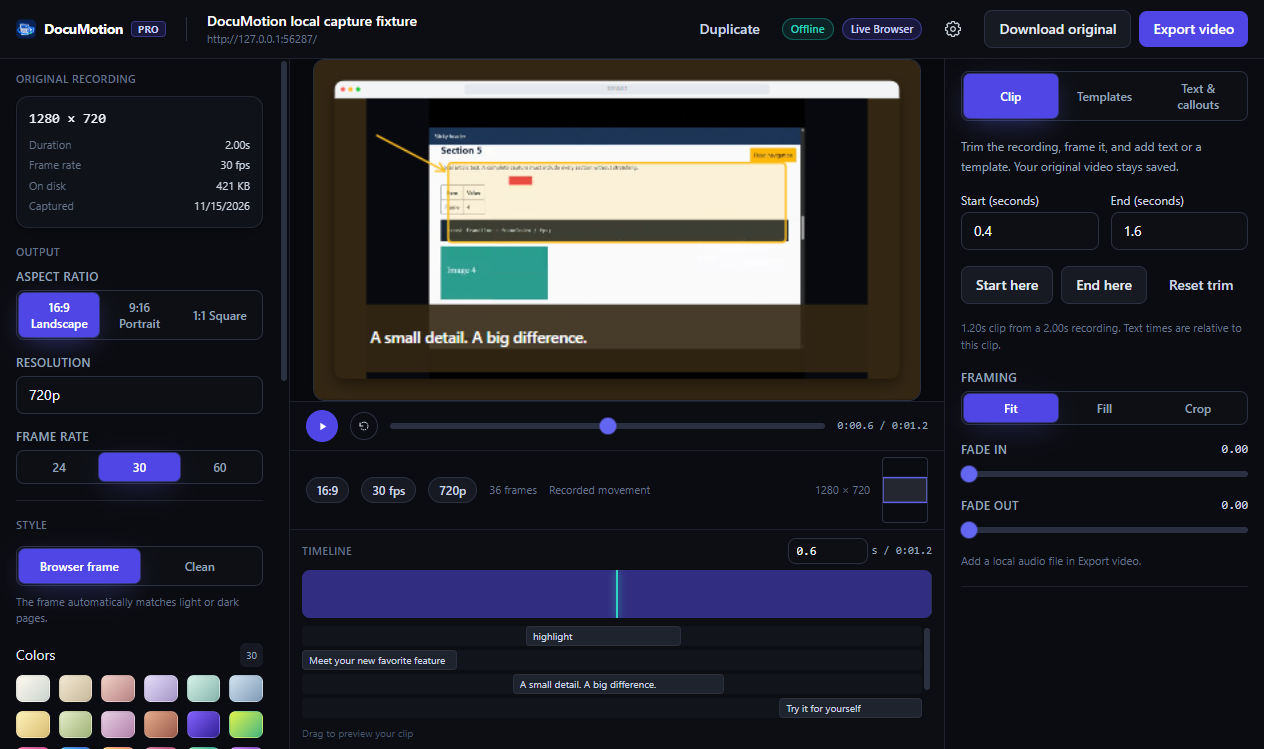
PROCompleted Live Browser recordings—and previously saved Live projects—now open inside the full DocuMotion timeline editor rather than stopping at a raw WebM download.
- Non-destructive clip trimming: Set start and end times with Start here, End here, and Reset trim while preserving your original clip via Download original.
- Framing & zoom: Switch between Fit, Fill, and Crop with 1×–4× zoom plus video fade in and fade out.
- Full studio styling & multi-format export: Apply backgrounds, wallpapers, browser window chrome, local audio tracks, project duplication, callouts, and re-export to WebM, MP4, or GIF without recording again.
Text, Arrow & Highlight overlays
PROLayer up to 24 timed visual callouts directly on top of both Full Page captures and Live Browser recordings.
- Three overlay types: Auto-wrapping Text boxes (font size 2–12%, alignment, text & background colors, opacity), 8-direction Arrows, and tinted Highlight boxes.
- On-canvas editing & timeline tracks: Drag to move or resize handles right over the preview (plus keyboard arrow-key nudging), set None / Fade / Slide entry motion, duplicate layers, and adjust layer z-order or timing bars.
Video Templates
PROApply a complete walkthrough structure in seconds across Full Page captures and trimmed Live Browser recordings.
- Three guided presets: Website Launch (15s), Portfolio Reveal (20s), and Product Feature (18s).
- Customizable content & instant rollback: Edit the opening headline, feature message, closing message, and accent color—auto-configuring keyframes, overlays, browser frame, rounded corners, shadow, and fades—with one-click Undo template application and Remove all pauses.
Fix for Live Browser recording
FIXResolved startup and teardown issues during Live Browser tab recording in Chrome and Edge.
- Queued pending Live Browser starts safely across the
tabCaptureauthorization prompt and popup close lifecycle so recordings no longer drop if the popup dismisses during initialization. - Ensured page scroll position and cursor styling restore cleanly after both completed recordings and mid-capture cancellations, and opens finished recordings into the editor automatically.