
Pin DocuMotion in Chrome
Click the Extensions puzzle icon in Chrome’s top-right toolbar and click the pin next to DocuMotion so the capture popup is always one click away.
Your extension is installed and ready. Turn webpages, Live Browser recordings, and PDFs into scrolling walkthroughs—captured, edited, and exported locally on your device.
Start free with full-page capture and PDF import—no account or external upload required.
Click the Extensions puzzle icon in Chrome’s top-right toolbar and click the pin next to DocuMotion so the capture popup is always one click away.
Fine-tune scrolling and framing in the timeline studio. Export landscape 720p WebM free, or unlock Pro for Live Browser clip editing, callouts, templates, 4K, 60 FPS, MP4, and GIF.
Recorded live in Chrome on ChessAnalyzer.pro—showing Full Page capture, Auto Camera, 30 gradients & 24 wallpapers, Video Templates, callouts, PDF import, Live Browser clip editing, and multi-format export.
Every website tells a story. Turning it into a studio-grade video shouldn’t take a timeline suite. Open DocuMotion on any live page — here, ChessAnalyzer.pro. Full Page capture scrolls, triggers lazy content, keeps sticky headers pinned, and stitches every tile right inside your browser.
Zero re-captures needed. Flip scroll direction from top or bottom, choose speed presets or custom pixels per second, dial in six easing curves or custom Bezier handles, add start and end pauses, or frame with Fit, Fill, and Crop zoom.
Want dynamic focus? Suggest points reads headings and layout landmarks to place smart camera stops automatically. Tweak any numbered timeline point for X, Y, zoom, move time, and per-point easing — or apply six creative presets in one click.
Match the page automatically with a light or dark browser frame, or switch cleanly to a borderless canvas. Sample colors straight from the site, pick thirty gradients or twenty-four wallpapers across six collections, tune padding, corners, shadow, and add intro or outro titles.
Need a guided cut fast? Apply Website Launch, Portfolio Reveal, or Product Feature templates with custom copy and accent. Then layer up to twenty-four timed text callouts, arrows, and highlights directly on the preview with drag handles and animations.
Beyond webpages: import local PDFs up to sixty-four megabytes and three hundred pages, load a URL, or unlock password-protected decks. Every PDF page renders privately in Chrome and opens in the exact same camera editor.
For interactive apps and live hover states, Live Browser captures two to one hundred twenty seconds cleanly with optional cursor hiding. Drop in any local MP3, WAV, or M4A soundtrack with independent volume and fade controls.
Click Duplicate to spin one capture into widescreen sixteen-by-nine, vertical nine-by-sixteen, and square variants. Render up to 4K at sixty frames per second in MP4 or WebM with custom bitrate, or crisp animated GIFs sized for any feed.
All media stays local in your browser — with page-access revocation, one-click cleanup, and diagnostics inside Settings. DocuMotion Free includes core page captures, 720p widescreen, scrolling, live preview, and WebM exports. Go Pro on up to three devices to unlock 4K sixty, auto camera, styles, templates, callouts, live capture, audio, MP4, and GIF. DocuMotion. One click from any page to finished motion.
Three new Pro creative tools alongside smoother Live Browser recording startup and page restoration—see full details in the Changelog.
Recorded Live Browser clips now open in the full studio so you can trim non-destructively, switch Fit/Fill/Crop zoom, add callouts or audio, and re-export to WebM, MP4, or GIF.
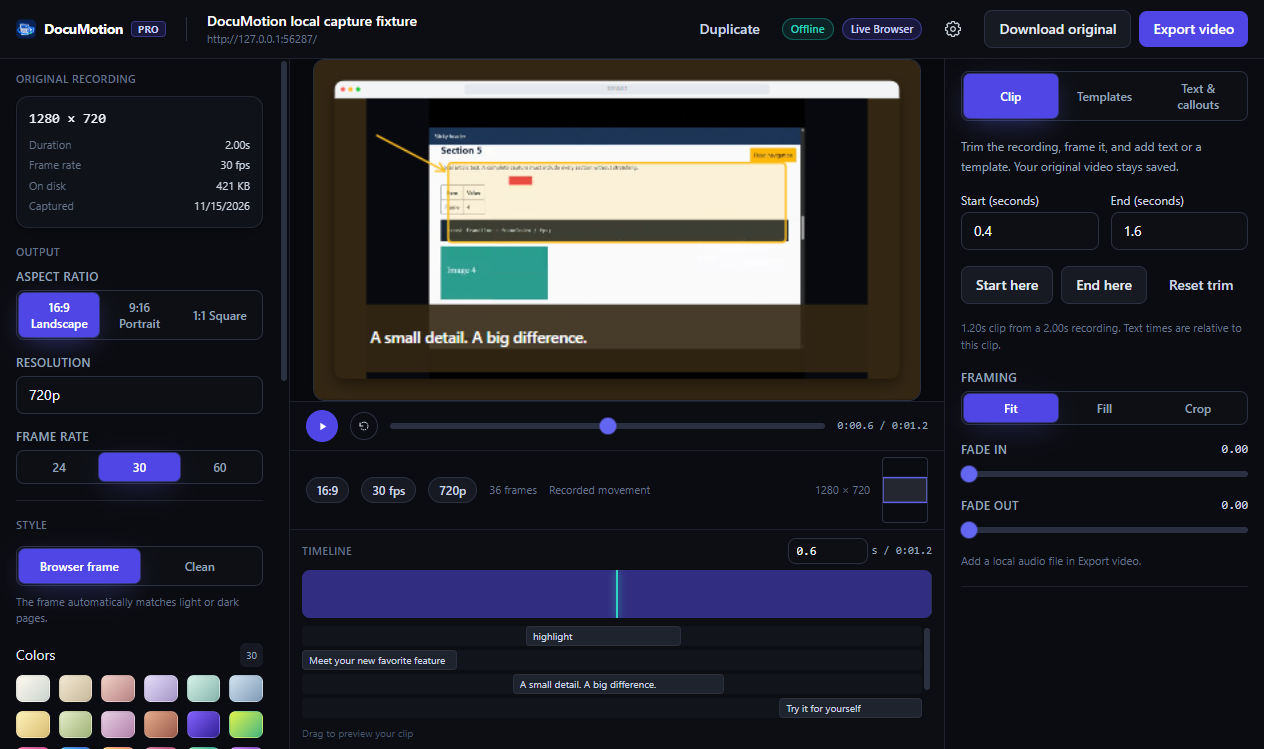
Layer up to 24 timed Text boxes, 8-direction Arrows, and Highlight frames directly onto Full Page captures or Live Browser clips with draggable canvas handles.
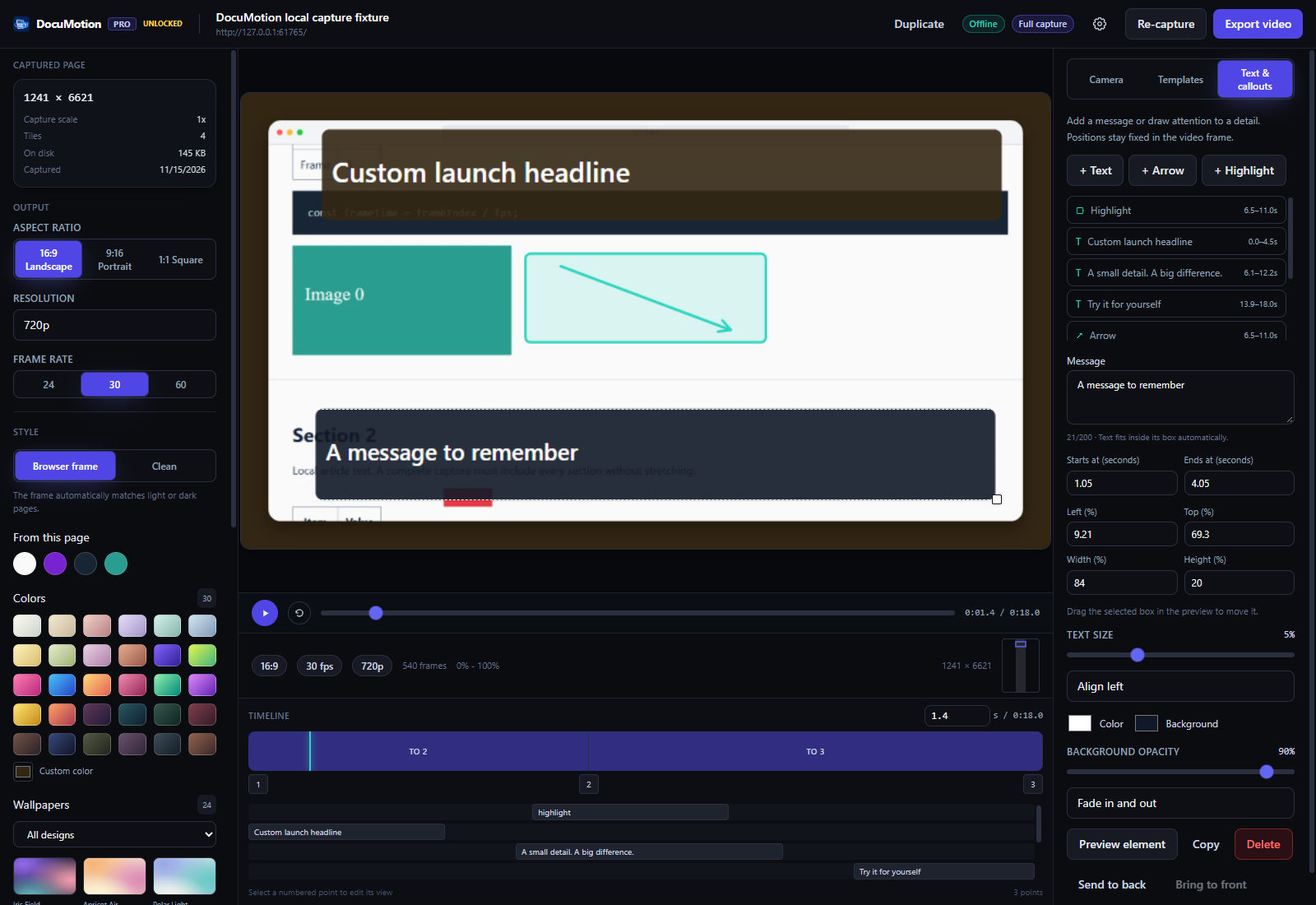
Kickstart any demo with customizable Website Launch, Portfolio Reveal, or Product Feature templates—one click applies keyframes, callouts, and framing.
Right-click the DocuMotion toolbar icon and choose Options (or open Settings from the popup) to paste your Polar license key—valid on up to 3 active devices with one one-time purchase ($4.99).